Turning Kaguya's imported catalog into an editable database
on this page
Kaguya’s visual-novel catalog came from VNDB. By March 2026, it contained roughly 60,000 visual novels, 156,000 characters, 146,000 releases, and 27,000 producers.
Users could rate and review those entries, but they could not correct the catalog or add something that did not exist in VNDB. We wanted to support both.
That meant Kaguya would stop being a one-way copy. An imported visual novel might begin with VNDB’s description and later be corrected in Kaguya. A user-created visual novel would have no VNDB record at all. Future dumps still needed to import new records and refresh values such as ratings and vote counts, but they could no longer replace every field without considering changes made in Kaguya.
We chose not to add an approval queue. Once editing opened, saved changes went live immediately. Every save therefore needed to record who made it and why, preserve the earlier state, show what changed, and provide a way to restore an older version.
I built the first version around full JSONB snapshots. It supported creation and editing for visual novels, characters, producers, and releases, along with numbered revisions, history, and revert. It worked, but I replaced the storage model before we opened it to users.
The first version used JSONB snapshots
I started with one revisions table. Each row stored the revision metadata and a JSONB snapshot of the complete entity state:
revisions
  entity_type
  entity_id
  revision_number
  action
  author
  summary
  changed_fields
  source
  snapshot JSONB
  inserted_at
I partitioned the table by entity_type, with one partition each for visual novels, characters, producers, and releases. Most history queries already knew which type they were loading, so Postgres could skip the other partitions.
Each entity type had its own snapshot function. A visual-novel snapshot included its main fields, localized titles, and relations. A character snapshot included its visual-novel appearances. Producer and release snapshots included their external links.
A simplified visual-novel snapshot looked like this:
{
  "description": "...",
  "release_date": "2011-06-24",
  "titles": [
    {
      "lang": "en",
      "title": "Steins Gate",
      "official": true
    }
  ],
  "relations": [
    {
      "visual_novel_id": "...",
      "relation_type": "same_setting"
    }
  ]
}
I stored the complete state at every revision, not only the fields changed by that edit. If revision 17 changed only the description, its snapshot still included the dates, titles, relations, and every other tracked value.
The alternative was to store only patches:
revision 1
  + patch from revision 2
  + patch from revision 3
  + ...
  + patch from revision 17
That would repeat less data, but loading revision 17 would require applying every earlier patch in order. Full snapshots used more storage, but viewing or restoring one revision did not depend on the entire patch chain remaining readable and compatible.
I completed the first backend flow on this model. It supported creation and editing for visual novels, characters, producers, and releases, along with numbered revisions, entity and contributor history, recent changes, conflict detection, and revert. Records created directly in Kaguya could start at revision 1 without a VNDB ID.
When I needed the same history to power diffs and restores, JSONB pushed more work into application code.
In the live schemas, Postgres stored dates and UUIDs as typed columns, while Ecto treated values such as relation_type as enums. The JSON snapshot serialized all of them as strings:
live schema
  release_date = Postgres date
  related_vn_id = Postgres UUID
  relation_type = application enum

JSON snapshot
  "release_date": "2011-06-24"
  "related_vn_id": "550e8400-e29b-41d4-a716-446655440000"
  "relation_type": "same_setting"
Postgres could verify that the document was valid JSON. It could not verify that "2011-06-24" belonged in a date field or that "same_setting" was valid for relation_type. The restore path had to parse those values back into the types expected by each schema and rebuild titles, relations, appearances, and links from nested JSON.
Schema changes added another versioning problem. If I added development_status, newer snapshots contained the key and older snapshots did not:
older snapshot
  description
  release_date
  titles
  relations

newer snapshot
  description
  release_date
  development_status
  titles
  relations
Every reader, diff, and restore path now had to understand both shapes. Nested rows such as titles and relations also needed their own matching and conversion rules before the history could produce a useful diff or restore them to the live tables.
I could have kept JSONB, but every diff and revert would first need to convert the saved document into the shape expected by the current schemas. That meant parsing dates and UUIDs from strings, filling fields that did not exist in older snapshots, and rebuilding nested titles and relations.
I would then be maintaining the catalog structure twice: once in Postgres and again in the code that interpreted historical JSON. The live catalog already stored those values and relationships in typed tables, so I used the same shape for history.
I kept full snapshots and moved them into typed tables
I did not switch from snapshots to patches. Every revision still represented the complete state at that point. I only changed how Postgres stored it.
VNDB’s open-source schema separated revision metadata from the historical state. I used the same split:
changes                         state captured at that change
  who / when / why / action  -> vn_hist
  entity / revision number      vn_titles_hist       0..n
  changed groups / source       vn_relations_hist    0..n
                                ...
The changes table held what a history list needed: the entity, revision number, action, author, summary, source, timestamp, and broad groups that changed.
The _hist tables held the state itself using normal Postgres columns.
The partitions had been useful when one table held both the revision metadata and the full JSON snapshot. After the split, changes contained only small metadata rows, while the larger state already lived in entity-specific history tables. I no longer needed to partition the metadata table.
For a visual novel, one revision looked like this:
change r17

  vn_hist
    one row with the description, status, dates,
    aliases, and other visual-novel fields

  vn_titles_hist
    one row for every localized title at revision 17

  vn_relations_hist
    one row for every related visual novel at revision 17
Although the snapshot now spanned several rows, it still represented the complete visual-novel state at that revision.
The history tables mirrored the live catalog:
live catalog                         revision history

visual_novels.release_date DATE   -> vn_hist.release_date DATE
vn_titles.lang TEXT               -> vn_titles_hist.lang TEXT
vn_titles.title TEXT              -> vn_titles_hist.title TEXT
vn_relations.related_vn_id UUID   -> vn_relations_hist.related_vn_id UUID
Dates and UUIDs stayed typed when history was written. Adding development_status meant adding a matching history column in the migration. Older revisions then exposed the same column as NULL or the migration’s default instead of presenting a different JSON document with a missing key.
Typed tables did not solve row identity by themselves. I still had to teach the diff how to match a title or relation across two revisions. The diff now worked with consistent rows and column types instead of first converting two JSON documents into the current schema.
This added schema work. Every tracked field or association added to the live catalog needed a corresponding history migration. I accepted that cost because diff and restore now worked with the same types and relationships as the live data.
I made the switch before editing opened to users, so I could remove the JSONB path instead of supporting two revision formats.
What happened when someone clicked Save
Suppose someone opened a visual novel at revision 12, corrected its English title and description, and entered a short edit summary.
The form submitted the edited values together with baseRevision: 12. I used that revision number for optimistic concurrency control. If someone had already saved revision 13, the backend rejected the older form instead of silently applying it over the newer state.
After checking the user’s edit permission, the backend ran the database work in one transaction:
load the visual novel and its editable associations
  -> reject the edit if the entry is hidden or locked
  -> compare baseRevision with the latest committed revision
  -> compare the submitted values with the live state
  -> reject the save if nothing changed
  -> update the live row and its related data
  -> allocate revision 13
  -> insert the change metadata
  -> reload the saved visual novel
  -> store its complete typed snapshot as revision 13
The catalog update and its history committed together. If a title, relation, change row, or history write failed, Postgres rolled back the whole edit.
Each catalog entry had its own revision sequence. Visual novel 42 might be at revision 12 while visual novel 81 was at revision 4.
To create the next revision, the backend read the latest number and added one. Without coordination, two saves for visual novel 42 could both decide that the next number was 13.
I protected that step with a transaction-scoped Postgres advisory lock keyed by the entity type and ID:
save visual novel 42
  -> acquire lock for visual novel 42
  -> allocate its next revision number

another save for visual novel 42
  -> wait for the same lock

save visual novel 81
  -> use a different lock
  -> continue independently
The lock serialized revision-number allocation for the same record without blocking edits to other records. A unique index on the entity type, entity ID, and revision number enforced the same rule at the database level.
I put the shared workflow in the Revisions context. It handled the optimistic concurrency check, no-op detection, transaction, revision numbering, change metadata, and history snapshot. Each entity context remained responsible for its own writes.
A visual-novel edit updated its main fields and localized titles, and wrote both sides of a visual-novel relation. Character edits synced the appearance rows connecting them to visual novels. Release edits updated their producer links and recomputed the producer list shown on the visual-novel page from the VN’s releases.
This let the four entity types share one revision workflow without forcing their different data models through one generic update function.
Creation went through the same revision flow. A visual novel, character, producer, or release created directly in Kaguya had no VNDB ID and started at revision 1. Someone could create a producer, add a visual novel, create a release connecting the two, and then add its characters. Each record kept its own history while their relationships appeared together on the visual-novel page.
Every successful save now left a numbered revision and a complete snapshot.

Making revisions readable
A complete snapshot was enough to restore an older state, but the history page still needed to explain what the contributor had changed.
When someone opened revision 13, the backend loaded its snapshot and the snapshot from revision 12. Fields with one value were simple to compare:
release date
before: 2011-06-20
after: 2011-06-24
The harder cases were the parts of an entry stored across several rows. A visual novel could have titles in multiple languages, relations to other visual novels, covers, and screenshots. A character could appear in several visual novels.
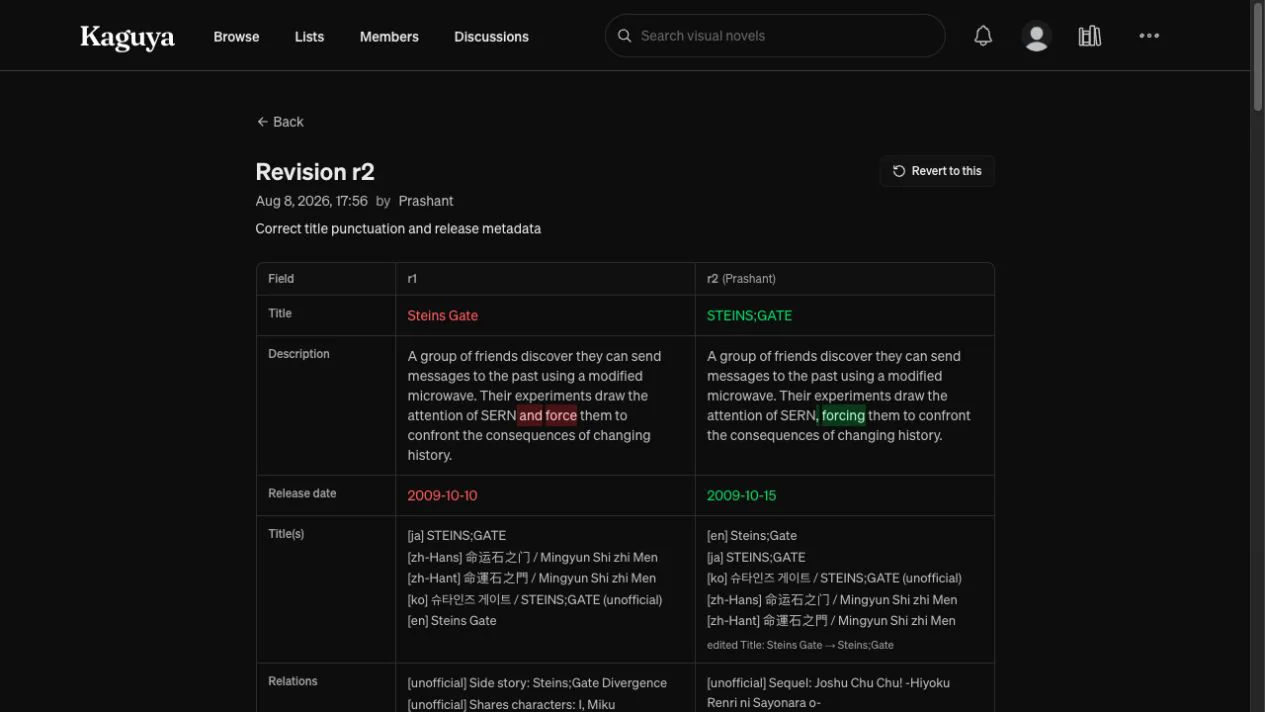
At first, the diff compared each title, relation, cover, or screenshot row as a complete value. A punctuation correction therefore made the old title disappear and a new title appear:
before {lang: "en", title: "Steins Gate", latin: null}
after {lang: "en", title: "Steins;Gate", latin: null}
Kaguya’s editor used one localized title per language, so lang: "en" identified the English title across both revisions.
I added an identity rule for each kind of repeated data:
title -> language
visual-novel relation -> related visual-novel ID
character appearance -> linked visual novel or character
cover or screenshot -> image ID
The backend used those identities to pair rows from the two revisions before comparing their other fields.
only in revision 13
-> added
only in revision 12
-> removed
same identity in both revisions
-> compare the remaining fields
-> unchanged or changed
For the English title, the backend matched both rows using lang: "en" and reported that the title field had changed.
Relations needed the same treatment. Suppose a relation to the same visual novel changed from same_setting to sequel. The related visual novel still identified the relation; relation_type was the value being edited. Matching on both the visual novel and the type would have produced one removed relation and one added relation. Matching on the visual novel ID produced one changed relation with an old and new type.
The backend returned that structure through GraphQL:
added
removed
changed
  old row
  new row
  fields that changed
It also resolved referenced visual novels and characters in batches. The browser received their names instead of rows full of UUIDs.
On the Next.js page, I defined which fields to show for each entity type, the order they appeared in, and the label used for each one. A visual-novel diff showed fields such as Title, Description, Main title language, Release date, and Length instead of dumping database field names in schema order.
I also translated stored values into the text a reader expected. in_development became In development, very_long became Very long (50+ hours), image IDs became thumbnails, and missing values appeared as [empty].
Descriptions and release notes needed finer highlighting. Showing the full old and new paragraphs made a one-word correction easy to miss, so I split both values into words and punctuation and ran a longest-common-subsequence comparison over those tokens.
I first ran the same comparison character by character. Around the phrase CLOSEST TO, the algorithm matched the T in TO with the final T in CLOSEST, leaving one character marked as unchanged inside text that had otherwise been removed. Comparing words and punctuation kept the highlighting aligned with the words a reader would recognize as added or removed.
Reverting an edit created another revision

Revert did not delete the unwanted edit or move the revision number backwards. If someone selected revision 6, the backend restored the state recorded there and saved the result as a new revision:
r6 last known good state
r7 unwanted edit
r8 another edit
r9 restore the state recorded at r6
Revisions 7 and 8 remained in the history. Revision 9 recorded who performed the revert, when they did it, and the summary they entered.
At first, I restored the saved snapshot through the same path used for an ordinary edit. That path deliberately accepted only fields a contributor could change. Someone could edit a title or description, but they could not directly set the slug, hide or lock an entry, or change system-managed values such as its primary image IDs.
Those fields still belonged in history because a revision represented the complete tracked state. Sending the snapshot through the public edit path meant revert could not restore everything Kaguya had recorded.
I separated the two operations:
apply_edit
-> validate values submitted through the editor
-> update contributor-editable fields
apply_hist
-> load a typed snapshot already stored by Kaguya
-> restore the complete tracked state
apply_hist only received snapshots loaded from Kaguya’s own history tables. It could therefore restore system-managed fields without making those fields writable through the public editor.

Saving covers and screenshots
When someone selected a cover or screenshot, the editor showed a local preview and requested a presigned upload URL from the API. The browser then uploaded the file directly to Cloudflare R2 while the user continued editing the page.
I changed the flow twice before settling on the final version. My first version attached the image as soon as its upload finished. Leaving the editor without saving the rest of the form did not undo that attachment. I then moved uploads into Save, but a slow upload could still be running when the page navigated away.
The version I kept started the upload when the image was selected, then made Save wait for the result:
select an image
-> show a local preview
-> upload it to a staged key in R2
click Save
-> wait for uploads still in progress
-> stop if an upload failed
-> attach the staged images
-> save their metadata, removals, and the rest of the edit
-> navigate after the edit succeeds
The editor tracked each selected image as uploading, staged, or failed. Removing an image cancelled its upload if it was still running. If an upload failed, the preview remained in the form with an error, and Save stopped before changing the catalog.
Once the uploads had finished, the final edit included the values currently shown in the form, such as a cover’s language, release date, or NSFW flag, along with any removed covers or screenshots.
If the final edit returned an error, the form stayed open. Clicking Save again reused images that had already been uploaded or attached instead of repeating those steps and creating duplicates.
R2 and the catalog database completed their work separately. The form stayed open if an upload, attachment, or catalog save failed, and navigated only after all three had succeeded. When the catalog edit created a revision, its snapshot included the attached images and the metadata saved with them.
The edit flow now recorded changes made through Kaguya. The VNDB importer still wrote to the same records outside that flow.
Keeping VNDB imports from undoing edits
Before catalog editing, the bulk VNDB import could safely treat the dump as the latest version of every record. It inserted new entries and updated existing ones with an upsert.
That stopped being safe once users could edit the same data:
VNDB description A
-> imported into Kaguya
-> a contributor corrects it to B
-> the next dump still contains A
Revision history would show that the importer had changed B back to A, but only after the correction was already gone.
I changed the bulk import to check which records had a user-authored revision before applying updates. For those records, it treated catalog content differently from values that still belonged to VNDB.
| Incoming data | No user revision | User revision exists |
|---|---|---|
| Description, titles, aliases, relations, and other catalog content | Update from VNDB | Keep Kaguya’s version |
| VNDB rating, vote count, source timestamps, and sync metadata | Update | Update |
| New VNDB record | Insert | Not applicable |
An untouched visual novel still received the complete VNDB update. Once someone edited it in Kaguya, later dumps continued refreshing its rating and vote count without replacing its description, titles, relations, or other curated content. I applied the same rule to characters, producers, releases, and their related data.
Records created directly in Kaguya had no VNDB ID, so the importer had no upstream row to match against them.
I protected content at the entity level rather than tracking ownership field by field. If someone corrected a description, the import also stopped replacing that entity’s titles and relations. A field-level merge would have been more precise, but it would have required provenance and merge rules for every field and related row. For Kaguya, protecting all user-editable catalog data on an edited record was the smaller and safer rule.
VNDB still supplied new records and refreshed ratings, vote counts, and source timestamps. Once a user edited a record, later bulk dumps left its catalog content alone.
That protected future edits from the dump. The existing catalog still needed a starting point in history.
Giving the existing catalog a starting revision
The revision system arrived after Kaguya had already imported roughly 390,000 visual novels, characters, producers, and releases. Those records had current catalog data but no earlier snapshot. If someone edited one immediately, their correction would become revision 1, with nothing to compare against or restore.
I wrote an idempotent seed task that captured each record’s current state as its starting revision. The task skipped anything that already had history, so it was safe to rerun.
Running the normal revision flow one entity at a time would have required several reads and writes for every record. I added a bulk path instead:
group records by entity type
-> process them in chunks
-> insert change rows in bulk
-> preload the current catalog state
-> bulk insert the typed history rows
In a recorded local run, it seeded 397,869 entities in 37 seconds.
I also made the edit transaction enforce the baseline. Before applying the first user edit to an imported record, the revision layer checked whether any history existed. If it did not, the backend first captured the current imported state as revision 1, then saved the user’s change as revision 2.
current imported state
-> revision 1
first user edit
-> revision 2
This ensured that a user correction never became the only recorded state for an existing catalog entry.
I then updated the main dump path so newly imported visual novels, characters, producers, and releases created revision 1 when they entered Kaguya. By the time editing opened publicly, new imports already entered through that revision-aware path.
Reviewing changes across the catalog
The seed and revision-aware import paths now produced history across the catalog. Reviewing it one entry at a time was no longer practical, so I added /changes, a feed of recent revisions from visual novels, characters, producers, and releases.
A revision stored the entity type and ID, but the feed also needed the entry’s name and URL. Instead of loading the referenced entity separately for every row, I grouped the revisions by type, loaded each group in one query, and joined the results back to the feed.
The seed and import jobs had also created hundreds of thousands of automated revisions. They were useful when inspecting one entry’s history, but they made a poor default for the global feed because recent user corrections disappeared between import rows. I made /changes show user-authored revisions by default, with VNDB and system changes available through a filter.
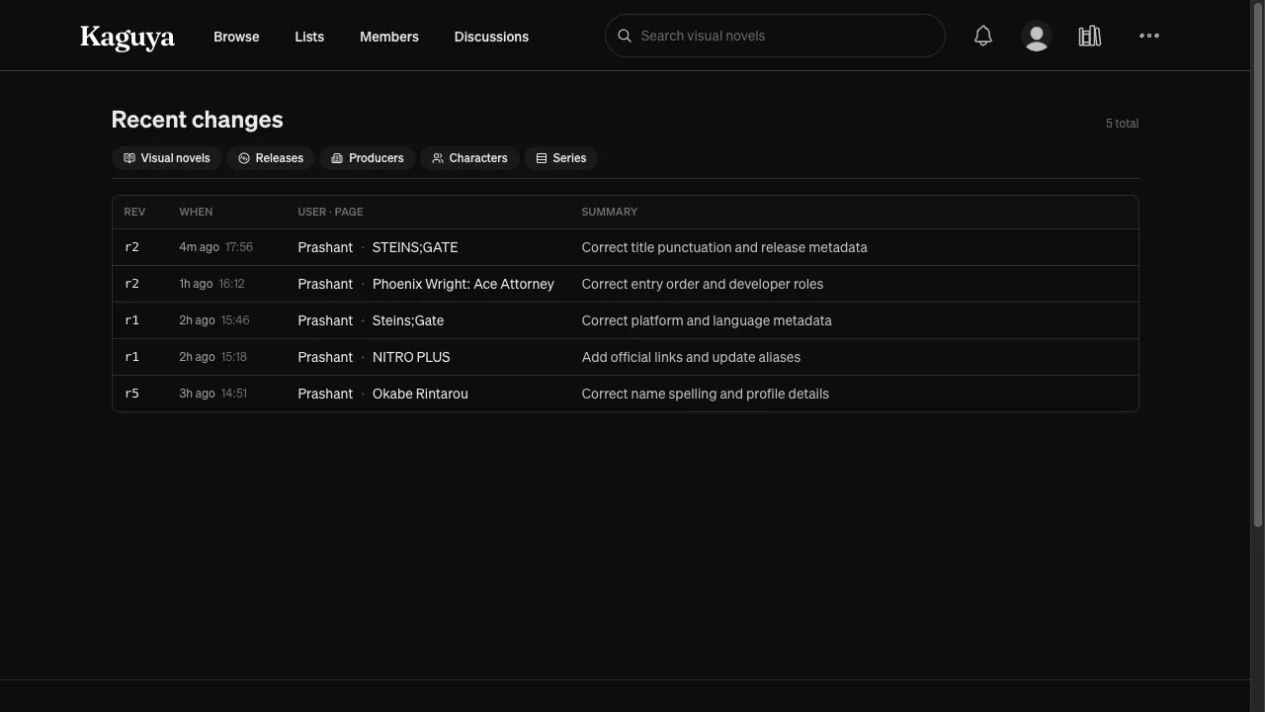
Because /changes opened on user edits, its main access pattern became the latest rows where source = user, ordered by newest first. The existing indexes were built around the history of one entity, so I added (source, inserted_at DESC). On a local database with roughly 400,000 change rows, the list query dropped from about 130 ms to under 1 ms, and its count query dropped from 23 ms to under 1 ms.
Contributor profiles used the same history data for edit totals and recently edited entries. People could also expand an edit to see its diff. Since every diff required the selected revision and the revision before it, I kept them collapsed on the initial page and loaded only the requested diffs, batching them when several were opened together.

During integration, I kept the editing and history routes restricted to admins while I tested permissions, uploads, and restore. Once those flows were ready, we made revision history, diffs, and /changes public and opened creation and editing to permitted users. Anyone with edit permission could also revert an entry. Hide and lock remained moderator actions because they controlled visibility and whether further edits were allowed.
Adding series to the same revision flow
After opening editing for the original four entity types, I added series as the fifth.
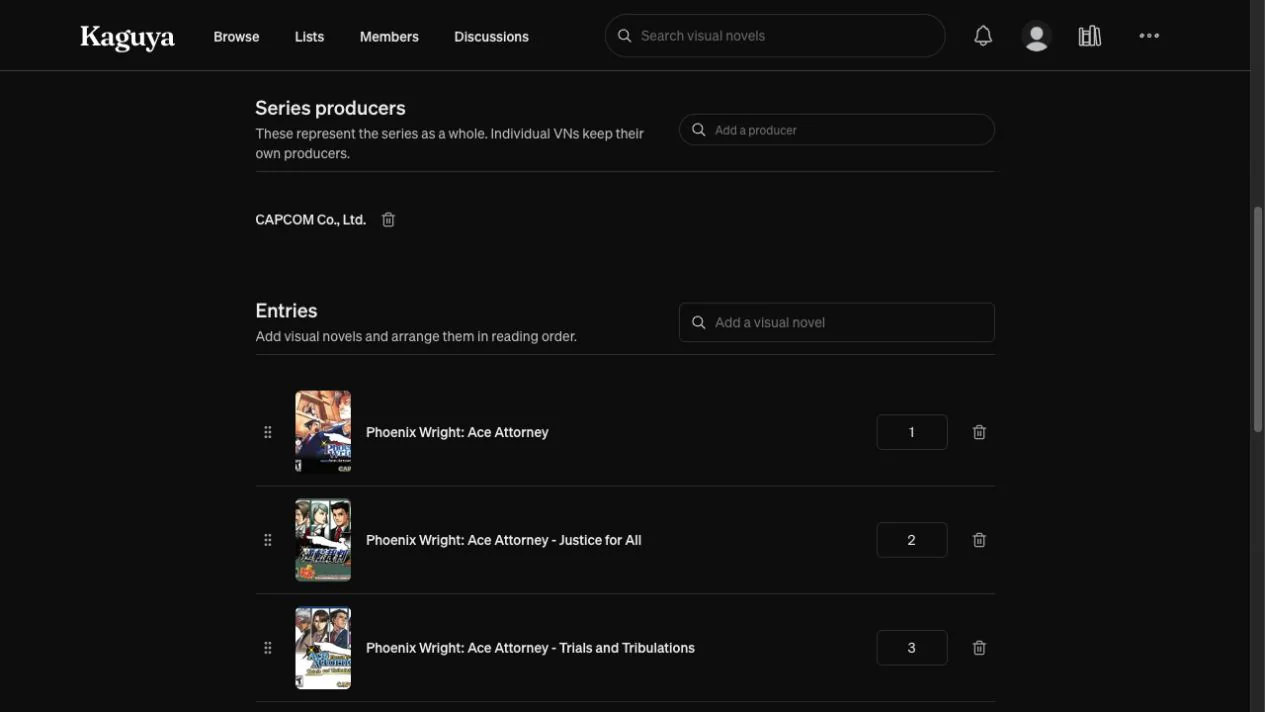
A series added two important pieces of state: an ordered list of visual novels and the producers associated with it. Its history needed to preserve which visual novels belonged to the series, their order, and each producer’s role.
I registered series with the same Revisions workflow used by the other entity types. The series context handled its own writes and snapshots:
series
  -> main series fields

series items
  -> visual novel and position

series producers
  -> producer and role
This added three history tables:
vn_series_hist
vn_series_items_hist
vn_series_producers_hist
Series also had its own VNDB import path. Before it became editable, the importer regenerated its visual-novel membership and producer data from VNDB. I changed that flow to reconcile incoming data without replacing the order or producer roles already edited in Kaguya.
Adding series took the revision system to five entity types and 16 typed history tables. It kept its own form, writes, and diff rules while reusing the same save, history, diff, and revert flow as the other entities.
At that point, Kaguya could accept records that did not exist in VNDB and preserve corrections to imported records across later dumps. VNDB still supplied new entries, ratings, and vote counts. Kaguya kept the catalog changes made by its users and the history needed to inspect or revert them.